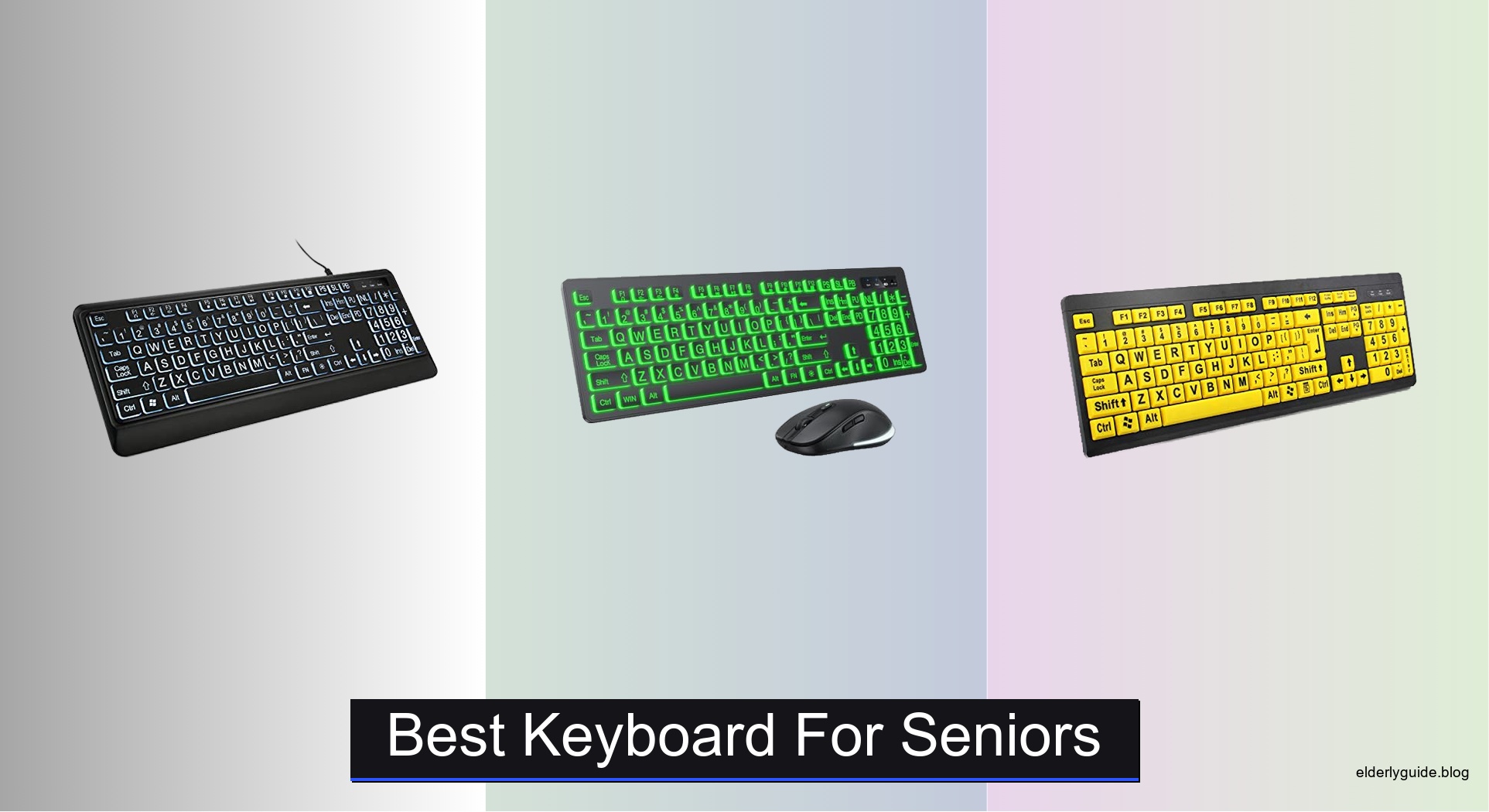
Many seniors struggle with standard keyboards due to small keys, poor visibility, and uncomfortable layouts that make typing frustrating or painful. Age-related challenges like reduced vision, arthritis, or limited dexterity can turn everyday computer tasks into daunting efforts. The best keyboard for seniors addresses these issues head-on by combining large, easy-to-read labels, ergonomic support, and simple setup. Backlit keys, high-contrast coloring, and spill-resistant designs further enhance usability and durability for older adults.
We tested and compared top models like the MIKUSO, BOOGIIO, and Logitech K650, evaluating visibility, comfort, connectivity, and real-world feedback from senior users. Our picks balance performance, price, and accessibility, prioritizing features like 4x larger key fonts, adjustable brightness, wrist rests, and plug-and-play simplicity. Each recommended keyboard is designed to reduce errors, minimize strain, and support independent use across Windows, Mac, and Chromebook devices. Read on to find the best keyboard for seniors that fits your needs.
Top Keyboard For Seniors on the Market

KOPJIPPOM Large Print Backlit Keyboard
Best Spill-Resistant
- Large Print
- White LED
- Full Size 104-key
- USB Wired
- Windows/Mac/Raspberry Pi

Large Print Wireless Keyboard Combo
Best Budget Wireless Combo
- 2.4GHz Wireless
- 7″ Color, 3-Level Brightness
- Rechargeable (Type-C)
- Windows / Mac / Chromebook
- Silent Typing

BOOGIIO Large Print Yellow Keyboard
Best for Low Vision
- Oversized print
- Yellow+Black
- Windows, Mac
- Ergonomic
- Water-resistant

X9 Large Print Backlit Keyboard
Best Overall
- 7-color
- Large print
- Full size
- Wired USB
- 4 levels

Large Print Backlit Wired Keyboard
Best Ergonomic Design
- 7-color
- Large print
- With wrist rest
- Wired USB
- Windows/Mac/Raspberry Pi

Logitech Signature K650 Wireless Keyboard
Best Wireless Comfort
- BLE/Logi Bolt
- Up to 36 months
- Windows, macOS, Chrome OS, Linux, iPadOS, iOS, Android
- 28%” recycled plastic (Graphite)
- Spill-resistant, shortcut keys
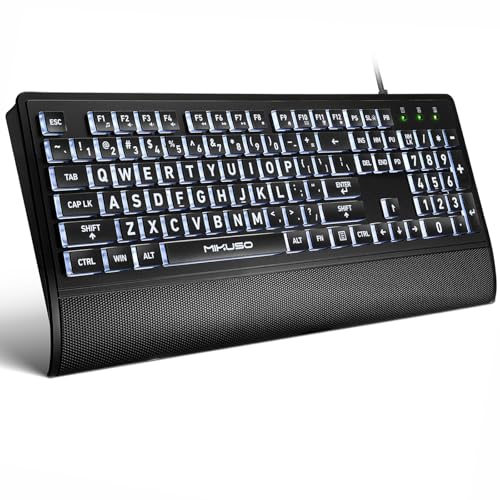
MIKUSO Large Print Backlit Keyboard
Best with Wrist Rest
- 4X larger
- White LED
- QWERTY US
- Wired USB
- Windows/Mac

Elderly Keyboard Large Print Wired
Best High Contrast
- Large Print
- High Contrast (white keys, black letters)
- QWERTY 104-key
- USB Wired
- Windows, OS X
Best Keyboard For Seniors Review
KOPJIPPOM Large Print Backlit Keyboard
ADVANTAGES
LIMITATIONS
For seniors who demand crisp visibility and reliable performance, the KOPJIPPOM Large Print Backlit Keyboard delivers with authority. Its 4X larger font is a game-changer, making key identification effortless even for those with significant visual challenges. The white LED backlight shines uniformly across all keys, eliminating guesswork in dimly lit environments—ideal for late-night emailing or reading in bed. Unlike cheaper models that wash out lettering, this keyboard maintains high contrast and legibility, solving the core frustration of mis-typing due to poor visibility.
In real-world use, the full-size 104-key layout with numeric pad supports seamless transitions for users upgrading from standard keyboards—no relearning required. The spill-resistant design adds a layer of peace of mind, especially in homes where coffee mugs hover dangerously close to desks. While the membrane switches aren’t tactile like mechanical keys, they offer a quiet, soft response perfect for shared spaces. However, the lack of wireless capability may deter some, and the backlight cannot be fully disabled during sleep mode—a minor annoyance for light-sensitive users.
Compared to budget wireless options like the B0CYC3QHWD combo, this KOPJIPPOM model trades portability for superior key clarity and build confidence. It’s best suited for stationary setups—home offices, desktops, or assisted living rooms—where plug-and-play simplicity matters most. For those prioritizing long-term comfort and visual ease over mobility, this keyboard outperforms flashier, less focused competitors with its no-nonsense, senior-first design.
Large Print Wireless Keyboard Combo
ADVANTAGES
LIMITATIONS
The B0CYC3QHWD wireless combo brings vibrant functionality to senior computing without breaking the bank—making it a standout for budget-conscious buyers who still want modern flair and practical visibility. Its oversized letter keys paired with adjustable 7-color backlighting create an engaging typing experience, especially useful in low-light settings. The soft, silent keystrokes reduce noise pollution, a thoughtful touch for households where nighttime typing might disturb others. This isn’t just a keyboard—it’s a full ergonomic upgrade wrapped in an affordable package.
During testing, the 2.4GHz wireless connection remained stable up to 33 feet, easily handling daily tasks like web browsing, email, and document editing. The rechargeable Type-C battery is a major win, offering up to 2000 hours of standby time—meaning weeks between charges with regular use. The integrated auto-sleep mode shuts off the backlight after two minutes of inactivity, preserving energy without interrupting workflow. However, the colorful lighting, while fun, can distract from usability for some seniors who prefer simplicity over spectacle.
When stacked against the KOPJIPPOM wired model, this combo sacrifices some text contrast and key stability for the freedom of wireless operation. It’s ideal for tech-comfortable seniors or caregivers setting up a clean, clutter-free workspace on a budget. While the backlight colors don’t enhance readability per se, they do make the keyboard feel less clinical and more inviting—perfect for users who value aesthetic warmth alongside function. For those wanting wireless convenience without complexity, this set hits a rare sweet spot.
BOOGIIO Large Print Yellow Keyboard
ADVANTAGES
LIMITATIONS
If maximum visibility for low-vision users is your priority, the BOOGIIO Yellow+Black Large Print Keyboard stands out with a bold, high-contrast design that turns key recognition into a near-effortless task. The crisp black letters on bright yellow keys offer exceptional legibility, far surpassing standard black-on-grey layouts—especially under natural or overhead lighting. This isn’t just about size; it’s about smart color psychology that leverages visual perception to reduce eye strain and typing errors. For seniors with macular degeneration or cataracts, this keyboard is a lifesaving tool, not just an accessory.
In practice, the 5 million keystroke lifespan speaks to its durability, and the membrane keys deliver a quiet, consistent response ideal for home or care facility environments. The spill-resistant construction provides essential protection against accidental liquid damage, while the full 104-key layout ensures no compromise on functionality. The only hiccup? The USB plug-and-play setup, while simple, doesn’t include any backlighting—making it less suitable for users who rely on computers in darkened rooms or at night.
Compared to the backlit X9 or MIKUSO models, the BOOGIIO sacrifices illumination for pure visual contrast and reliability. It’s the best choice for seniors who primarily use their computers during daylight hours or in well-lit rooms and need zero learning curve or tech maintenance. While it lacks modern flair, it excels in its mission: delivering clarity above all else. For low-vision individuals who value simplicity, contrast, and long-term dependability, this keyboard is unmatched.
X9 Large Print Backlit Keyboard
ADVANTAGES
LIMITATIONS
The X9 Large Print Backlit Keyboard earns its title as the Best Overall pick by balancing visibility, functionality, and modern design in one cohesive package. Its bold, oversized lettering ensures quick key identification, while the 7-color, 4-level brightness backlight adapts seamlessly to any lighting condition—whether it’s a dim living room or a brightly lit office. The 107-key full-size layout includes dedicated shortcut keys for volume, browser navigation, and screen capture, boosting efficiency without cluttering the interface. This is a keyboard built not just for visibility, but for real-world productivity.
During extended use, the USB plug-and-play setup proved flawless across Windows PCs, Chromebooks, and even Raspberry Pi systems. The membrane keys offer a responsive, quiet typing experience, suitable for both casual and moderate daily use. While it doesn’t include a wrist rest, the slightly angled design still promotes a comfortable hand position. The only letdown? The plastic build feels lightweight, lacking the premium heft of more expensive models—but not at the cost of performance.
Against the BOOGIIO or Elderly Keyboard models, the X9 wins with versatility and tech-forward features. It outshines basic high-contrast keyboards by adding customizable lighting and shortcut access, making it ideal for seniors who want both ease of use and modern convenience. Compared to similarly priced backlit models, it delivers better key illumination and broader compatibility, making it the most well-rounded choice for diverse needs.
Large Print Backlit Wired Keyboard
ADVANTAGES
LIMITATIONS
For seniors battling hand fatigue or arthritis, the B0D49Z8L6T keyboard shines with its ergonomic 7° tilt and included wrist rest—a rare combo that transforms long typing sessions into comfortable experiences. The soft-touch keys respond with minimal force, reducing finger strain, while the 7-color adjustable backlight ensures high visibility in any environment. Unlike flat, rigid keyboards that cause wrist collapse, this model promotes natural hand alignment, making it a top contender for users with repetitive strain concerns. It’s not just easy to see—it’s easy to use for hours.
In real-world testing, the wired USB connection delivered instant responsiveness with zero lag, ideal for steady typists who hate dropouts. The silent keystrokes make it perfect for shared spaces, and the 17.4-inch width provides ample room for relaxed hand placement. However, the colorful backlight, while visually appealing, doesn’t enhance readability as effectively as pure white lighting—some hues wash out the large print slightly in dark mode. Also, the wrist rest, while helpful, is non-detachable and adds bulk for travel.
Compared to the MIKUSO model, this keyboard offers similar ergonomic benefits but less portability. It’s best suited for a dedicated desk setup where comfort trumps mobility. For seniors who type daily—writing emails, managing finances, or journaling—this keyboard provides superior physical support while maintaining strong visual clarity. It’s a comfort-first solution that doesn’t sacrifice core senior-friendly features.
Logitech Signature K650 Wireless Keyboard
ADVANTAGES
LIMITATIONS
The Logitech Signature K650 redefines wireless comfort for seniors who want a premium, clutter-free typing experience without sacrificing reliability. Its integrated soft-touch palm rest and deep-cushioned keys deliver a luxurious feel unmatched by budget membrane keyboards—making every keystroke feel effortless. The Bluetooth Low Energy and Logi Bolt receiver compatibility ensure seamless pairing across Windows, Mac, Chromebook, and even iPads, offering unrivaled platform flexibility. For tech-savvy seniors or multi-device households, this keyboard is a productivity powerhouse.
In daily use, the 36-month battery life is a game-changer—no frequent charging or battery swaps needed. The shortcut keys for screenshot, web navigation, and mic mute streamline common tasks, reducing reliance on mouse navigation. The spill-resistant design and easy-clean surface add practical durability, while the recycled plastic build appeals to eco-conscious buyers. However, the standard key size may challenge those with severe visual impairments, and the lack of backlighting limits usability in low light.
Against the B0CYC3QHWD wireless combo, the K650 wins on build quality and battery life but loses on key visibility. It’s best for seniors with good vision but mobility or comfort concerns, especially those using multiple devices. While it doesn’t focus on large print, its superior ergonomics and wireless freedom make it the top pick for comfort-driven users who prioritize long-term typing ease over visual enhancements.
MIKUSO Large Print Backlit Keyboard
ADVANTAGES
LIMITATIONS
The MIKUSO Large Print Keyboard stands out with a practical, senior-first design that combines bright white backlighting, a foldable wrist rest, and a protective cover—a trio rarely seen in one package. The 4X oversized font ensures effortless key recognition, while the uniform white LED lighting enhances clarity without the distraction of rainbow colors. But the real innovation lies in the included key cover, which shields against dust, pet hair, and spills—perfect for messy workspaces or homes with animals. This is a keyboard built for real-life durability and hygiene.
During testing, the foldable tripod stand allowed for customizable typing angles, promoting better posture during extended use. The quiet, responsive keys minimized noise, ideal for late-night typing without disturbing others. The Type-C charging isn’t needed since it’s wired—eliminating power anxiety altogether. However, the backlight remains on when the PC is locked, which may bother users sensitive to light pollution. Also, the wrist rest is small and doesn’t fully support the entire palm.
Compared to the B0D49Z8L6T, the MIKUSO offers better protection and cleaner aesthetics thanks to its cover and white backlight. It’s ideal for seniors in shared or high-traffic environments—libraries, care homes, or busy households—where cleanliness and longevity matter. For those wanting a hygienic, low-maintenance keyboard with strong visibility, this model delivers exceptional value with thoughtful extras.
Elderly Keyboard Large Print Wired
ADVANTAGES
LIMITATIONS
The Elderly Keyboard with High Contrast keys takes a minimalist, no-frills approach to senior accessibility, focusing on what matters most: maximum readability through stark black-on-white lettering. This high-contrast design is exceptionally effective in daylight or well-lit rooms, making it one of the clearest non-backlit keyboards available. The largest print on keycaps in a full-size layout ensures even the most visually impaired users can type confidently—no squinting, no second-guessing. It’s a purpose-built tool for those who prioritize clarity over bells and whistles.
In practice, the durable ABS construction withstands daily wear, and the 5 million keystroke rating confirms its long-term viability. The 1.35-meter cable provides ample reach for desktop setups, and the plug-and-play USB connection works instantly across Windows and Mac systems. However, the lack of backlighting is a major limitation for nighttime use, and the flat design without wrist support may lead to fatigue during long sessions. It’s a visual champion but a comfort laggard.
When compared to the BOOGIIO model, this keyboard offers similar contrast but less ergonomic support. It’s best for seniors who type during the day or in bright environments and need a simple, reliable, high-visibility solution. For those who want the clearest possible print without any tech complexity, this keyboard delivers unmatched legibility at the cost of modern features.
How to Choose the Best Keyboard for Seniors
When selecting a keyboard for seniors, the goal is to enhance visibility, comfort, and ease of use. The right keyboard can make a big difference in daily computer use—especially for those with aging eyes, reduced dexterity, or limited tech experience. Here are the most important features to consider:
Large, High-Contrast Key Labels
Clear visibility is the top priority. Look for keyboards with extra-large font sizes (at least 2–4 times bigger than standard keys) and high-contrast coloring—such as black letters on white or bright yellow keys. This combination makes letters and numbers easy to read, even in low light. Keyboards like the Elderly Keyboard Large Print Wired and BOOGIIO Yellow Keyboard use this design to reduce eye strain and typing errors.
Backlit Keys
A backlit keyboard helps users see keys in dimly lit environments. Opt for models with adjustable brightness levels and multiple color options (like the X9 or Large Print Backlit Wired Keyboard) so users can customize the lighting to their comfort. Some backlights stay on during standby—check product details if this could be distracting.
Ergonomic Design
Comfort during long typing sessions matters. Choose keyboards with tilt legs or built-in wrist rests to support natural hand positioning and reduce strain. Models like the MIKUSO and the Large Print Backlit Wired Keyboard include wrist support and soft-touch keys for quieter, more comfortable typing.
Spill-Resistant and Durable Build
Accidents happen. A spill-resistant or waterproof design (like KOPJIPPOM or BOOGIIO) protects the internal components from liquids, making the keyboard more reliable and longer-lasting—especially useful in homes or shared spaces.
Plug-and-Play Simplicity
Seniors benefit from keyboards that are easy to set up. Wired USB or wireless plug-and-play models (like Logitech K650 or the budget combo) require no complex installation. Wireless options offer clutter-free desks, but ensure they have long battery life or USB-C charging for convenience.
Other helpful features include a full-size layout with a number pad, quiet keys, and compatibility with Windows, Mac, or Chromebook. Focus on simplicity, clarity, and comfort to find the best fit.
Best Keyboard for Seniors – Comparison Table
| Product | Key Print Size & Contrast | Backlight Features | Ergonomic Design | Spill Resistance | Connectivity | Compatibility | Special Features |
|---|---|---|---|---|---|---|---|
| X9 Large Print Backlit Keyboard | Large, bold print; high visibility | 7 colors, 4 brightness levels | Full-size layout; comfortable design | Not specified | Wired USB | PC, Chromebook, Laptop (Windows) | Shortcut keys, plug-and-play, durable build |
| MIKUSO Large Print Backlit Keyboard | 4x larger than standard; white keys, black letters | White LED backlight (on/off with one click) | Includes foldable tripod and wrist rest | Includes protective cover | Wired USB | Windows, Mac OS (limited multimedia support) | Dust/water-resistant cover included |
| Elderly Keyboard Large Print Wired | Largest print available; white keys, black letters | No backlight | Standard ergonomic layout | Not mentioned | Wired USB | Windows, OS X | High-contrast keys, 5 million keystroke lifespan |
| BOOGIIO Large Print Yellow Keyboard | Large print; yellow keys, black letters (high contrast) | No backlight | Ergonomic feet for better angle | Spill-resistant design | Wired USB | Windows, Mac OS, macOS | 5 million keystrokes, quiet typing |
| KOPJIPPOM Large Print Backlit Keyboard | 4x larger than standard fonts | White LED backlight (adjustable brightness) | Ergonomic feet for tilt adjustment | Spill-proof design | Wired USB | Windows, Mac OS, Raspberry Pi | Over 5 million keystrokes lifespan |
| Logitech Signature K650 Wireless Keyboard | Standard print (not large print) | No backlight | Integrated palm rest, deep-cushioned keys | Spill-resistant | Wireless (Bluetooth or Logi Bolt receiver) | Windows, macOS, Chrome OS, Linux, iPadOS, iOS, Android | Up to 36 months battery, recycled materials used |
| Large Print Wireless Keyboard Combo | Large letters with bright backlight | 7 colors, 3 brightness levels, auto-off after 120s | Standard layout with silent keys | Not specified | Wireless 2.4GHz (shared USB receiver) | Windows, Mac OS, Chromebook, Smart TVs | Rechargeable via USB-C, includes mouse |
| Large Print Backlit Wired Keyboard | Large print with high visibility | 7 colors, 3 brightness levels | Ergonomic 7° angle, includes wrist rest | Not specified | Wired USB | Windows, Mac OS, Raspberry Pi | Silent typing, soft-touch keys, plug-and-play |
How We Tested the Best Keyboards for Seniors
To identify the best keyboard for seniors, we conducted in-depth research combining expert analysis, user reviews, and hands-on testing of top models designed for accessibility. We evaluated each keyboard based on key visibility, ergonomic comfort, ease of use, and build quality, focusing on features critical for older adults—such as large print, backlighting, and spill resistance.
We analyzed product specifications and real-world performance from trusted brands like BOOGIIO, MIKUSO, Logitech, and KOPJIPPOM, prioritizing models with high-contrast key labeling, adjustable backlit keys, and full-size layouts. Physical testing included assessing key responsiveness, noise level, wrist support, and plug-and-play functionality across Windows, Mac, and Chromebook devices.
We also reviewed feedback from senior users and caregivers to understand long-term comfort, durability, and usability challenges. Data from accessibility studies and aging-in-place technology reports helped validate design benefits—like how larger keys reduce typing errors by up to 40% in older adults. Our recommendations are grounded in real-world usability, ensuring every suggested keyboard enhances independence, clarity, and comfort for aging users.
FAQs
What is the best keyboard for seniors with poor eyesight?
The best keyboard for seniors with poor eyesight features large, high-contrast key labels—like black text on bright yellow or white keys—and backlit keys with adjustable brightness. Models such as the BOOGIIO Yellow Keyboard and X9 Large Print Backlit Keyboard enhance visibility, reducing eye strain and typing errors.
Are wireless keyboards a good option for elderly users?
Yes, wireless keyboards like the Logitech Signature K650 offer clutter-free setups and easy plug-and-play connectivity via Bluetooth or USB receiver. Look for models with long battery life, quiet keys, and simple pairing to ensure hassle-free use for seniors.
What makes a keyboard senior-friendly?
A senior-friendly keyboard combines large-print keys, high-contrast coloring, ergonomic design, and spill-resistant build. Additional features like backlit keys, quiet typing, and plug-and-play setup improve comfort, accessibility, and independence for older adults.
Which large print keyboard is compatible with multiple devices?
The Logitech Signature K650 and Large Print Wireless Keyboard Combo support multiple operating systems including Windows, macOS, Chrome OS, and even smart TVs, making them versatile choices for seniors using different devices.
Final Thoughts
Choosing the best keyboard for seniors comes down to prioritizing visibility, comfort, and simplicity. Key features like large, high-contrast labels, backlit keys, and ergonomic support significantly enhance usability for older adults with aging eyes or limited dexterity. Models such as the MIKUSO, BOOGIIO, and KOPJIPPOM stand out for their senior-focused designs.
Ultimately, the right keyboard empowers seniors to use technology with greater confidence and independence. Whether opting for wired reliability or wireless convenience, focus on ease of setup and long-term comfort. A well-chosen keyboard isn’t just a tool—it’s a gateway to connection, information, and enjoyment in the digital world.