Rideshare services like Uber are transforming transportation for older adults, offering independence and peace of mind. For seniors who want to stay mobile, whether for doctor visits, grocery runs, or visiting family, Uber provides accessible, safe, and easy-to-use options. This guide walks you through how to use Uber for seniors, including app-free calling services, simplified interfaces, caregiver support, and payment with health benefits cards.
Whether you’re tech-savvy or prefer talking to a real person, there’s an Uber solution that fits your lifestyle. You’ll learn everything from setting up a senior account to booking rides without a smartphone.
Set Up a Senior Uber Account for Simplified Rides
Uber’s Senior Account is part of the Family Profiles feature, designed to make ride-hailing easier for older adults. A family member or caregiver typically sets it up, but the senior remains in control of their rides.
How to Create a Senior Account
- Open the Uber app and tap Account, then Family.
- Tap Add new member and select Senior.
- Choose a contact from your phone and send an invitation via text or email.
- The senior receives a link to join. They must accept and download the Uber app if they don’t already have it.
- Once accepted, Simple Mode activates automatically for easier use.
The senior must accept the invite and set up their own login. The caregiver cannot book rides until the account is fully active.
Benefits of a Senior Account
• Simplified app experience with larger buttons and text
• Saved destinations like Doctor’s Office or Pharmacy
• Flexible payment options including Medicare Flex Cards
• Real-time ride tracking by trusted family members
This setup gives seniors independence while letting caregivers stay involved when needed.
Enable Simple Mode for Easier App Navigation

Simple Mode is a cleaner, less cluttered version of the Uber app, perfect for seniors with vision challenges or limited tech experience. The interface reduces cognitive load while maintaining full functionality.
Features of Simple Mode
• Larger text and icons for better visibility
• Fewer on-screen choices to prevent decision fatigue
• One-tap access to saved locations
• Clear display of driver details including name, car, license plate, and ETA
How to Turn On Simple Mode
- Tap Account in the Uber app.
- Go to Settings, then Accessibility.
- Toggle Simple mode on.
If you have a Senior Account, Simple Mode usually turns on automatically when the account is created. Pro tip: Add frequent destinations like Church or Grocery Store under Saved Places so they appear with one tap.
Use Family Profiles for Caregiver Support
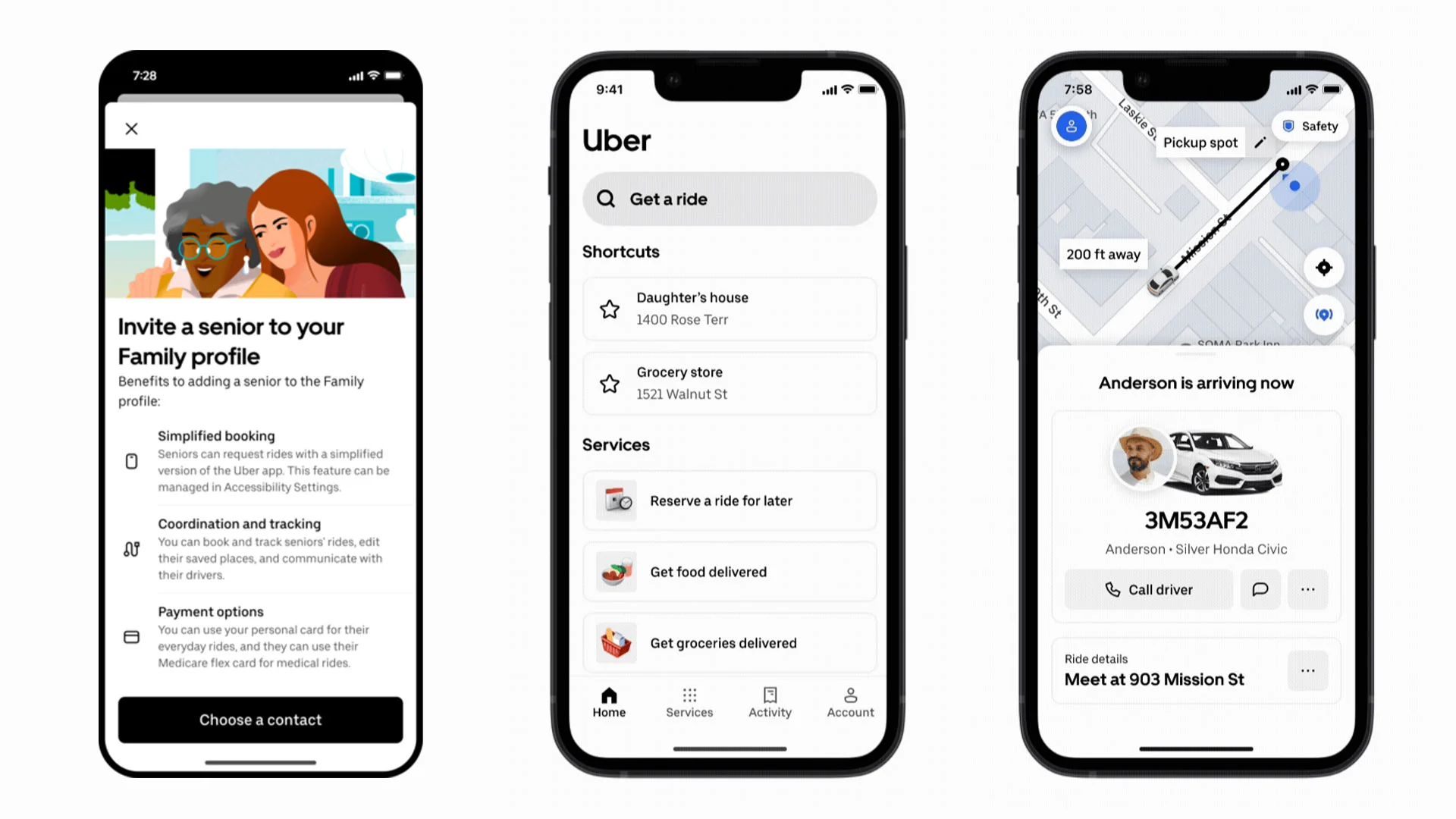
Family Profiles let caregivers help seniors manage rides without taking over completely. This feature strikes a balance between support and independence for aging adults.
What Caregivers Can Do
• Book rides using the senior’s account
• Pay with their own card or a shared health benefits card
• Track trips in real time through GPS
• Message or call the driver to assist with pickup
• Add or edit saved locations for the senior
How It Helps Seniors
Even if you struggle with technology, you still own your account. Your ride history, preferences, and safety tools stay under your control. Your family simply helps coordinate when needed.
Example: Your daughter books your weekly dialysis ride using her card, but you see all trip details and can contact Uber support directly if needed.
Pay for Rides with Medicare Flex Cards
Many seniors can use their Medicare Advantage health benefits card to pay for eligible Uber rides. This makes transportation more affordable for regular medical appointments.
Eligible Ride Types
• Doctor appointments and medical checkups
• Pharmacy pickups for prescriptions
• Grocery shopping trips
• Visits with family and friends
• Community events and social activities
How to Add Your Health Benefits Card
- Open Uber app and tap Wallet.
- Tap Add payment method, then select Health benefits card.
- Enter card details and save.
- Optional: Share the card with your Family Organizer by tapping Share.
After setup, Uber will automatically use this card for eligible trips. Check with your Medicare plan to confirm coverage, as original Medicare Parts A and B do not cover rideshare services.
Request Rides Without a Smartphone
No smartphone? No problem. Uber offers two ways to book rides over the phone, making rideshare accessible to seniors who prefer not to use apps.
Call 1-833-USE-UBER for Phone-Based Booking
Uber’s Call to Ride service lets you book rides without an app. This official service provides human assistance for seniors who need it.
Key Details
• Phone number: 1-833-873-8237 (toll-free)
• Hours: 5:00 AM to 1:00 AM Eastern Time, 7 days a week
• Languages: English or Spanish
• Text-capable phone required for trip updates
How to Book a Ride by Phone
- Call 1-833-USE-UBER from your registered phone number.
- An agent helps create an account if needed and books your ride.
- Add a credit or debit card during the setup process.
- Get trip details via text message including driver name, car, plate, and ETA.
- Confirm the driver matches before getting in.
Limitations include no cash payments, must call from registered number, one-way trips only, no multi-stop rides, and Uber WAV availability only in NYC and Chicago. You can schedule rides up to 90 days in advance, which is great for medical appointments.
Use GoGoGrandparent for Live Operator Support
GoGoGrandparent connects you to real people who book Uber or Lyft rides for you, no app required. This service provides hands-on support for seniors who want full assistance.
Why Seniors Love GoGoGrandparent
• Call anytime: 1-855-464-6872 (press 0 for operator)
• 24/7 availability including holidays
• Live person books your ride for you
• Operators track your trip and notify family
• No Uber account required
Cost Structure
You pay the standard Uber fare plus a concierge fee of $0.27 per minute. A 20-minute ride equals $5.40 in service fees. This is billed to your credit card after the trip.
How to Book Through GoGoGrandparent
- Call 1-855-464-6872 and press 0 to speak with an operator.
- Provide pickup and drop-off addresses.
- Receive confirmation via call or text.
- The operator monitors your trip and alerts you when the driver arrives.
Bonus: GoGoGrandparent also arranges grocery delivery, meal delivery, and prescription drop-offs for added convenience.
Access Wheelchair-Accessible Vehicles
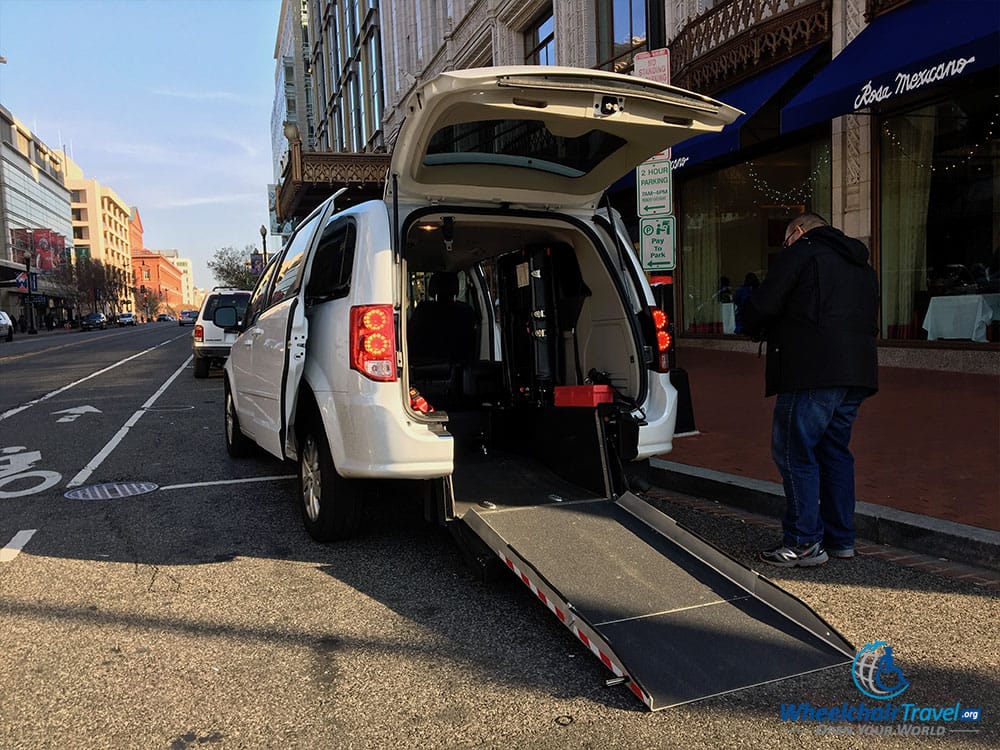
Seniors who use wheelchairs or need extra assistance have dedicated options through Uber. These services ensure mobility-impaired seniors can still travel safely.
Uber WAV for Wheelchair Users
Uber WAV vehicles come equipped with ramps or lifts, and drivers are trained to assist. This service is available in major cities including New York, Chicago, and Los Angeles.
How to Request Uber WAV
• In Uber app: Select WAV under ride options
• Via 1-833-USE-UBER: Only available in NYC and Chicago
• Via GoGoGrandparent: Nationwide where available
Note that WAV wait times may be longer, so book in advance when possible for medical appointments.
Uber Assist for Mobility Devices
For seniors who use walkers, canes, or folding wheelchairs, Uber Assist is a better fit than WAV. Drivers are trained to help with entry and exit, and there’s no extra charge for this service.
Request it in the app under Assist, or ask GoGoGrandparent to book it for you.
Stay Safe During Your Uber Rides
Safety is built into every Uber ride, with multiple layers of protection especially important for senior passengers. Understanding these tools helps you travel with confidence.
Built-In Safety Features
• Emergency button that connects to 911 or Uber’s 24/7 Safety Line
• Real-time ID Check where drivers verify their identity during trips
• Trip sharing to share live location with family
• Annual driver background checks for your protection
Tips for Safer Rides
• Always verify driver name, car, and license plate before entering
• Share your trip with a trusted contact in your contacts
• Use GoGoGrandparent for added human monitoring
• Carry a charged phone or emergency contact card at all times
Family members can track rides in real time through Family Profiles, giving everyone peace of mind.
Get Free or Subsidized Rides Through Local Programs
Uber doesn’t offer senior discounts directly, but free rides are available through local programs partnered with GoGoGrandparent. These programs help seniors with limited income maintain their independence.
Available Free Ride Programs
GoGoGrandparent partners with various agencies to provide subsidized transportation:
• Yonkers, NY: 6 free rides per month for seniors 60 and older
• Montana Area II Agency: 8 free rides per month plus 4 free grocery or prescription deliveries for seniors in Yellowstone and Fergus counties
Eligibility and registration requirements apply. Contact your local Area Agency on Aging to check availability in your area.
Medicare Advantage Coverage
Some Medicare Advantage insurers cover non-emergency medical transportation via Uber through Flex Card benefits. Ask your plan if they offer this coverage for rides to medical appointments.
Frequently Asked Questions About Uber for Seniors
Can I use Uber from an assisted living facility?
Yes. Many facilities allow Uber pickups. Ask staff about designated pickup zones or procedures. Some facilities have specific areas where rideshare drivers can meet residents.
Can I schedule weekly recurring rides?
GoGoGrandparent allows you to call and set up regular rides. The Uber app lets you schedule rides up to 30 days in advance using the Schedule Ride feature. The 1-833-USE-UBER service allows booking up to 90 days ahead. This is perfect for regular doctor visits or dialysis appointments.
What if I leave something in the car?
Report lost items through help.uber.com or the Uber app. Drivers receive alerts to check their vehicles after each trip. GoGoGrandparent operators can also help you retrieve forgotten items.
Can someone else request a ride for me?
Yes through Family Profile or GoGoGrandparent. However, 1-833-USE-UBER requires the account holder to call from their registered number. You cannot book through the phone service if someone else is calling on your behalf.
Is Uber available in rural areas?
Uber operates where drivers are available. Use GoGoGrandparent’s online service checker to confirm coverage in your specific area. Availability varies by location, and rural areas may have limited driver supply.
Key Takeaways for Using Uber as a Senior
Uber offers multiple pathways for seniors to maintain independence through safe, reliable transportation. Whether you prefer using the app with Simple Mode, calling 1-833-USE-UBER, or letting GoGoGrandparent handle everything, there’s an option that fits your comfort level and needs.
Start simple by trying Simple Mode or calling 1-833-USE-UBER to see which method works best for you. Add a trusted contact so family members can track your rides in real time. Use saved places to speed up booking with one-tap destinations. Always book wheelchair-accessible vehicles in advance when needed, and keep your phone charged for texts and emergency access.
Your next ride is just a tap or a phone call away.